
ChiroSpring 360 Side Menu Structure
ChiroSpring 360's Left Side Menu Options will depend on your User Role
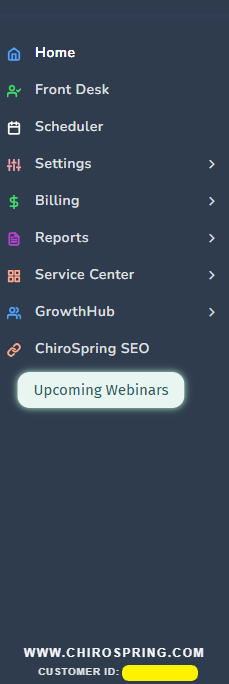
Your Customer ID can be found here at the bottom where the yellow highlight is when you are logged into your software
Settings
- Clinic:
- Setup, Users & Rooms, Scheduler & Appts, Diagnosis Favorites, Service Lists & Fees, Favorite Service Lists, Reminder Types, Customization
- Treatment Notes:
- Notes & Fee Slip - Visibility Settings/Notes Settings
- Spine - Tehniques and Listings/Findings
- Advanced Ditto
- New Configuration
- Configurations
- Custom Templates
- Build Template
- Template Lists
- Custom Macros
- Build Macro, Macro List, Nested, Pinned
- Communication:
- Work Flow Rules
- Communication Data
- Billing:
- Membership Types, Default Statement, Products, Third-Party Payers, Fee Schedules, Attorneys, Custom Services, Providers & Payers
- Subscription:
- Overview, Clinic(s), if applicable, Plans & Services
- Import:
- Products, Single Patient, Patient List, Patient Balances, Patient Credits
- Clinics - If you have toggle access to other clinics
Billing
- Pending Claims
- Claim Folder
- Open, Pending, Rejected, Held, Submitted, In Process, Prepay Cash
- Product Folder
- Product Sales
- Completed
- Statements
- Claim History
- Quick Post
- Assigned Documents
- Task center
- ERA Center
- Denial Queue
- Settings:
- Third Party Payers, Fee Schedules, Products, Custom Services, Membership Types, Attorneys, Default Statement, Providers & Payers
Reports
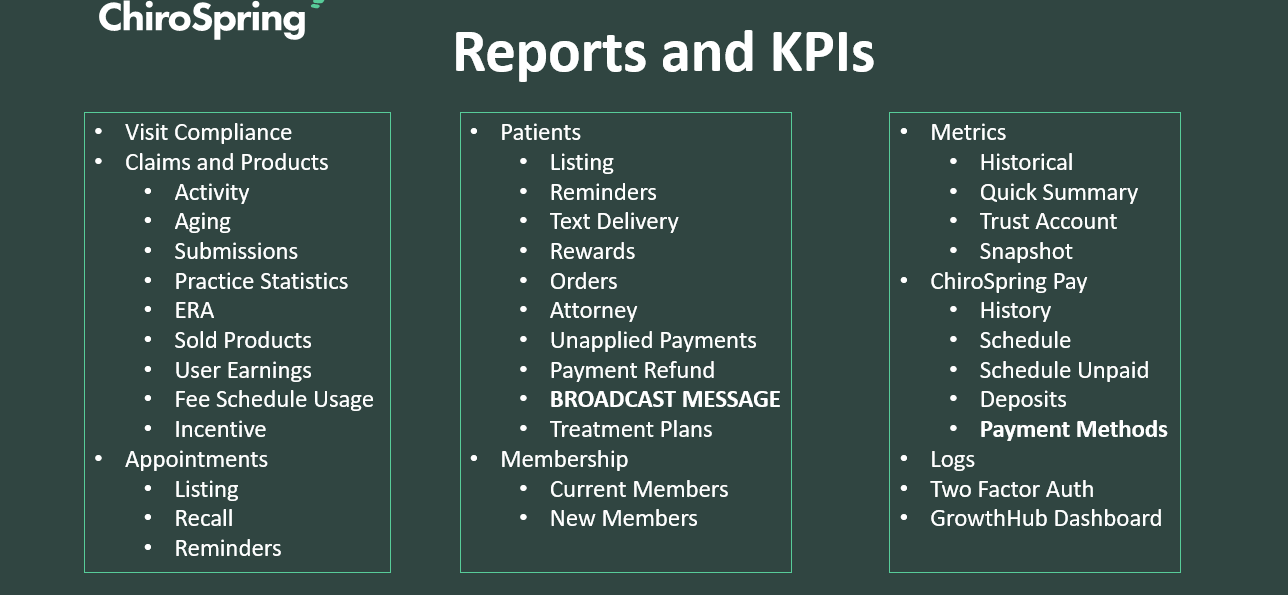
Service Center
- New Request
- Pending
- Completed
- Inbox
GrowthHub
- Dashboard
- All Leads
- Prospects
- Active/Inactive
- Patients
- Active/Inactive
- Add Lead
- Single/Import
- Text
- Broadcast Messenger
- Patient Recall
- Marketing Templates
- Email/SMS
- Settings
- Patient Loyalty
ChiroSpring SEO