
Treatment Dashboard - Date of Injury - How to Edit
The Date of Injury (Date of Current Illness/Injury) in the Treatment Dashboard pulls from claim item #14. You cannot edit this date on the Treatment Dashboard (it is for display purposes only and reflects the most recent date on any claim for this Box 14 claim item.

To edit the Date of Injury (Date of Current Illness/Injury), do this in the Fee Slip or on an actual claim.
Fee Slip
You may edit the Onset Date (which is in fact the Date of Current Illness/Injury Box 14 Date) on the Diagnosis tab. See below.

Claim
Claims can be edited in several areas of the software.
- Pending Claims
- Claim History
- Checkout Cash Register
When you edit a claim, navigate to find Box 14 and change the date there.
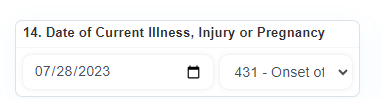
Once this is updated, it will change the Date of Injury on the Treatment Dashboard.
Remember, the Treatment Dashboard will always show the most recent date entered (for any claim). Editing past claims and changing this date will not update the Treatment Dashboard.