
Logs Report
The Logs Report provides a detailed audit trail of system activity, allowing you to track changes and actions within the platform. This includes logs for logins, clinic updates, patient records, claims, products, payments, documents, and appointments. *Only Administrators and Providers have access to this report.
Navigate to Reports > Logs

In this report, you can search for logs related to:
- Logins
- Clinic changes
- Patients
- Claims
- Products
- Payments
- Documents
- Appointments
Search by Patient
If you are searching for logs regarding a specific Patient, you can search this Logs Report with their 360 Patient ID number. Here's how you can locate the Patient ID number:
- Open the patients file
- In the URL, copy the number highlighted here:
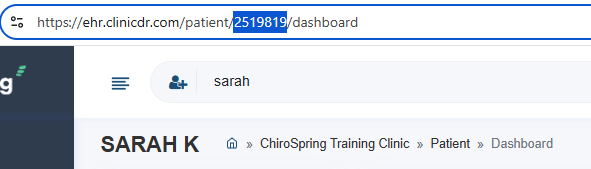
- In the Reports > Logs paste the patients ID number in the "Search by ID" field, then click "Reload":

Now you will see all logs for that specific patients account only.