
Household Text Messaging
We’ve made it easier for clinics to manage text messages for families who share a phone number. Until now, those text messages were saved and displayed under each individual patient, which often led to duplicate messages and confusion. Our new Household SMS logic changes that.
What’s New
You can now group related patients into a household and choose how text messages are handled:
Each member individually or Head of household
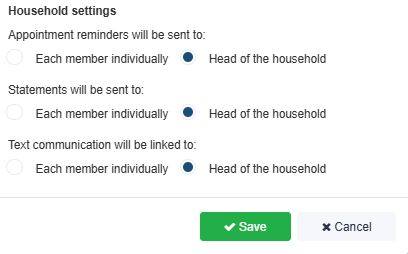
If the patient belongs to a household:
- SMS appears under that patient (Each member individually), or
- Under the head of household, depending on the setting.
When messages come from a number linked to more than one household, you’ll see “Received from [phone number]” to help identify who sent it.
Note: Existing households will stay set to Each member individually until changed. For New households, users can choose the preferred setting when creating or editing the household.
Bonus Updates
- You can now choose whether to view the conversation for the patient or the head of household.
Why It Matters
This update keeps shared number conversations organized, prevents message duplication, and gives clinics clear visibility when communicating with families.