
Eliminate Manual Entry Charges (for ERAs) Using ERA Center
With ERA Center (read more HERE) you are always in control of how your Electronic Remittance Advices (ERAs) are posted. If you prefer to post ERAs yourself, you can completely avoid manual entry charges (related to ERAs) by adjusting your settings—no intervention from our team required.
ChiroSpring’s ERA Center allows you to decide who posts your ERAs, and when. If you do not want our team to manually post ERAs on your behalf, you can easily manage this directly from your settings!
How to Prevent Manual Entry Charges for ERAs
To ensure ERAs are not manually posted by our team:
- Go to Settings > Clinic > Customization
-
Click into the PMR & Billing tab, and edit the settings under "ERA Center"
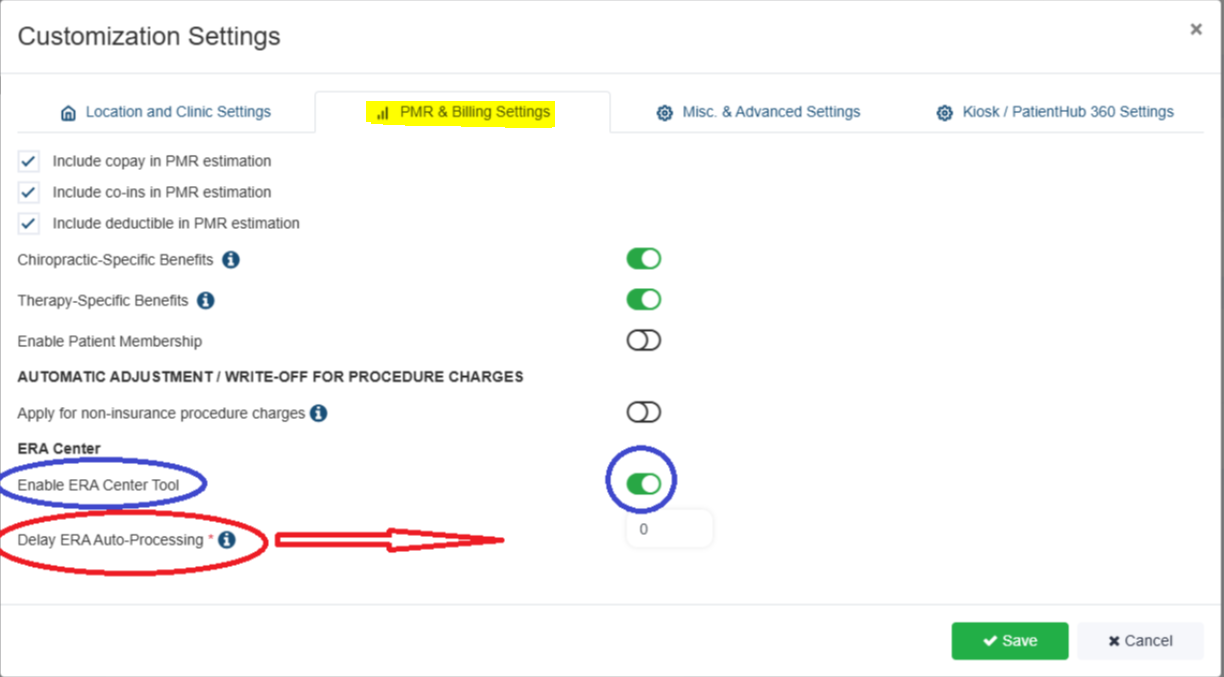
- Set the ERA Posting Delay to a future date (for example, 90 days)
By selecting a longer timeframe, you give yourself plenty of time to review and post ERAs on your own before any manual posting would occur.
Important: Error’d & Rejected Claims:
- Error’d and rejected claims do incur manual entry charges
- These claims require manual review and correction before they can be posted
- Manual entry charges apply when our team must intervene to resolve or post these claims