
Inside a High-Performance Billing Workflow - Using ChiroSpring 360
A real-world billing workflow used across multiple chiropractic practices
Replay of Live Webinar on Friday, February 6th, 2026 at 1:00 PM EST
- Copy of Slides
- Copy of QnA coming soon!
Objective
This SOP outlines the steps to effectively utilize the new billing workflow enhancements in ChiroSpring, ensuring streamlined billing processes and improved claim management.
Key Steps
Overview of Billing Enhancements 1:34
-
Review the billing enhancements made since April 2024.
Key updates include:
- PMR launch for calculating co-pays, co-insurances, and deductibles.
- Updated payment UI and checkout UI.
- New fee slip options and enhancements.
- Introduction of the denial queue and electronic eligibility features.
Utilizing the Denial Queue 5:18
- Access the denial queue to manage and resolve denied claims.
- Filter by denial codes to quickly identify issues.
- Use the denial queue to track and follow up on claims that require action.
Claim Submission Process 9:03
-
Understand the journey of a claim from submission to payment.
Ensure all necessary information is included in the claim:
- Date of service
- Diagnosis codes
- Modifiers
- Use the new fee slip to generate claims efficiently.
Managing Aging Reports 17:13
- Utilize the aging report to track outstanding claims.
- Add notes to claims in the aging report for better tracking.
- Regularly review and follow up on claims that are overdue.
Using the Submission Report 19:08
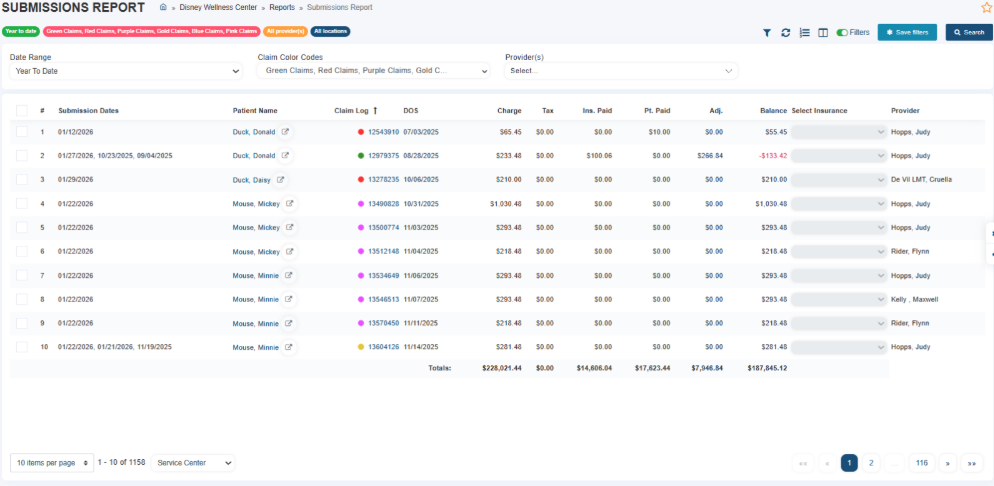
- Access the submission report to view:
- Submission dates
- Number of times a claim was submitted
- Use this report to identify claims that need resubmission.
Patient Mobile App Features 5:35
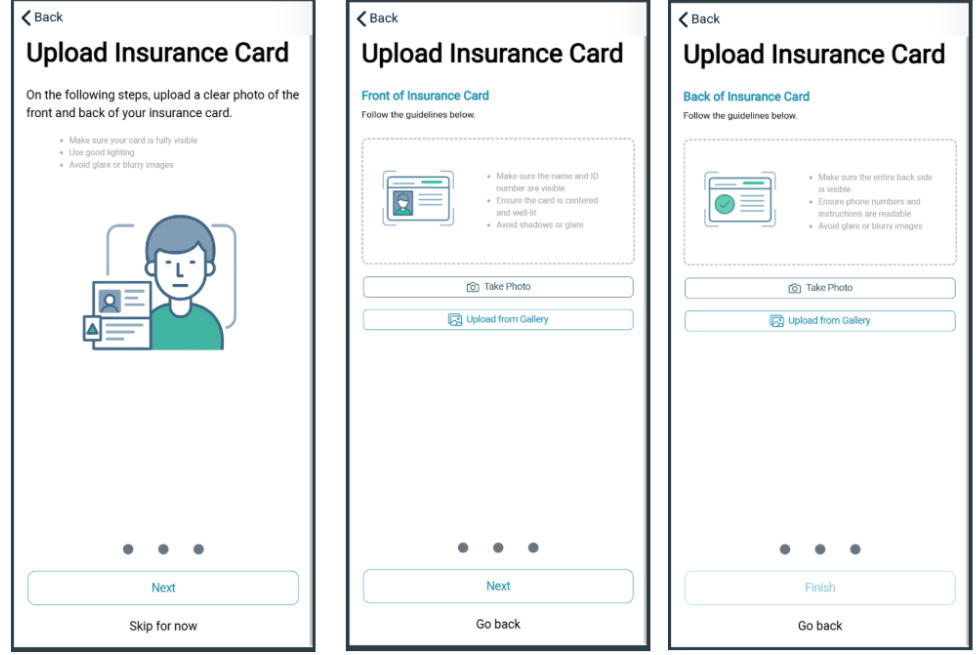
- Encourage patients to upload insurance cards via the mobile app.
- Ensure that uploaded documents are correctly linked to patient files.
Quick Posting of Patient Responsibility 45:59
- Change claims from gold to green by marking them as patient responsibility.
- Use the quick post feature to efficiently manage patient payments.
Cautionary Notes
- Always double-check the accuracy of patient information before submitting claims.
- Ensure that all claims are submitted with the correct payer information to avoid denials.
Tips for Efficiency
- Schedule regular reviews of billing settings and enhancements to stay updated.
- Utilize saved filters in reports to quickly access relevant claims.
- Train staff on new features to maximize the benefits of the billing enhancements.
Contact Catie Lydon: catie@specialtybillingsolutions.net