
ChiroSpring Product Release 2-26-2026
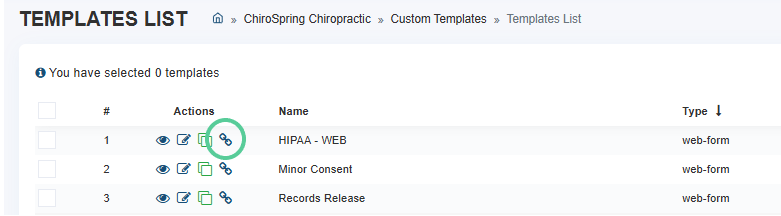
Direct Shareable Links
You can now generate direct links for:
Individual Web Forms
Send a single form directly via text or email or embed it on your website.
Perfect for administrative forms, consents, or standalone intake documents.
Online Booking
Create a booking link by selecting a Location, Appointment Category, and Provider.
All three selections are required to generate the link, ensuring patients book exactly what and where you intend.

Appointment Categories Available Online
Existing appointment categories can now be toggled to display for online booking.
This allows you to control which services are visible without creating custom links.

Use these links to:
- Send directly to patients
- Embed on your website
- Share in marketing campaigns
- Route patients to exactly what you want them to book or complete
Customizable Patient Intake Messaging
When assigning forms, you can now customize the message patients receive by text or email.
Instead of the default “You have forms to complete,” practices can tailor the message to match their tone and instructions.
Settings - Communication - Workflow Rules - Patient Intake
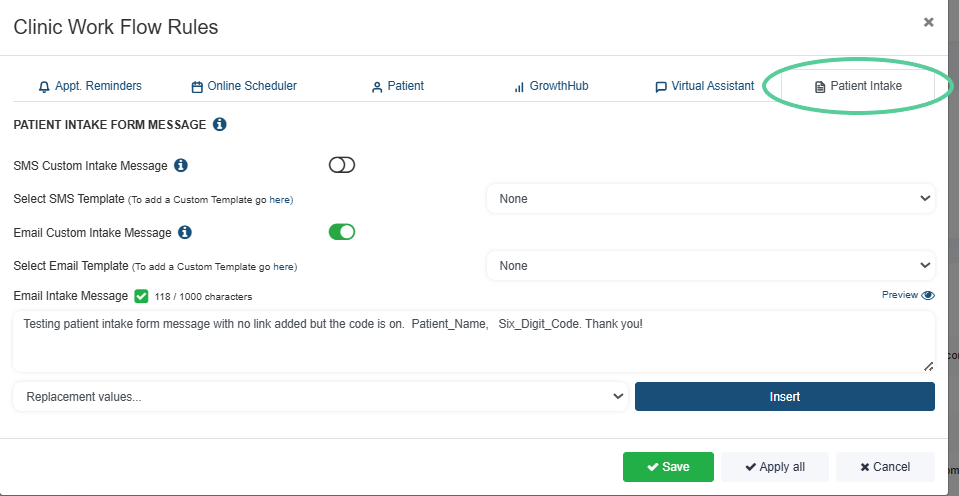
Now includes support for replacement values, including:
- Location for appointment reminders and confirmations
This gives practices more control over patient communication and branding.
Form Purpose Classification
Designate forms as:
- Treatment
- Administrative
Only Treatment forms will appear when inserting forms into treatment notes, keeping provider workflows clean and focused.

SMS Compliance Update
“Reply STOP” will now appear only when required and only on the initial SMS message.