
GrowthHub Pro +
Automate your patient communication without the manual follow-up. Campaigns and Waitlist in GrowthHub keep patients engaged and your schedule full, automatically.
Campaigns
New Campaigns section under GrowthHub
- Create automated workflows triggered by:
- Appointments (created, missed, canceled)
- Tags (added or removed)
- Build multi-step campaigns with actions like:
- Send SMS or Email
- Add or Remove Tags
- Set timing rules (minutes, hours, days before/after events)
- Control when campaigns stop (ex: when a patient checks in or completes all steps)
Campaigns are available in GrowthHub Pro+
Built for Real Workflows
Use Campaigns to:
- Follow up on missed appointments
- Re-engage inactive patients
- Trigger communication based on patient tags
- Send reminders and prep forms automatically
Campaign Management
- Save as draft or activate when ready
- Toggle steps on/off
- Archive campaigns
- View all campaigns and statuses in one place
👉Learn more about setting up Campaigns
What's Next
A new Campaign Reporting experience will be available in an upcoming release, providing deeper visibility into campaign performance, including delivery success and engagement metrics.
Waitlist
Fill open spots automatically without the back-and-forth. Waitlist helps you capture patient preferences and match them to newly available appointments, so you can keep your schedule full with less manual effort.
Key Features
- New Waitlist access from the Scheduler

- See who is in queue when adding appointment


- Central Waitlist view

-
Filter, manage, and take action quickly
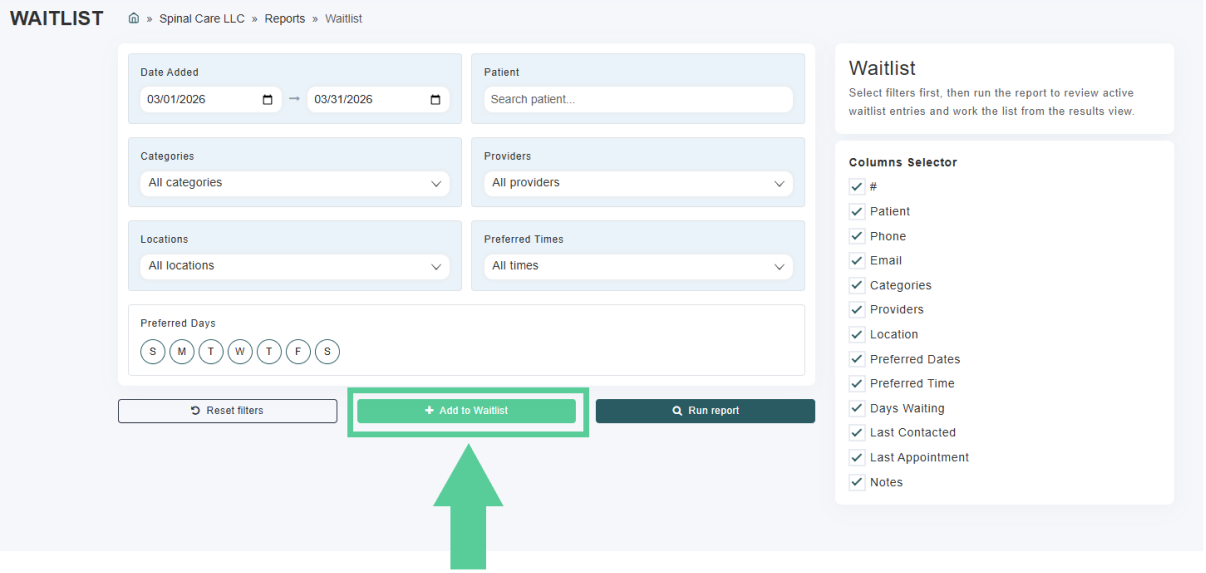
- See all patients waiting for an opening in one place

- Automated notifications (GrowthHub Pro+)
- When a spot opens, notify matching patients by SMS or email
- Customize your message and control how notifications are sent
- Auto-cleanup
- Automatically remove patients once they’ve been scheduled
Waitlist is included in GrowthHub Pro. Campaigns and automated Waitlist are included in GrowthHub Pro+.